Build Your Battle Station: The 2025 High-Performance Gaming Setup Guide
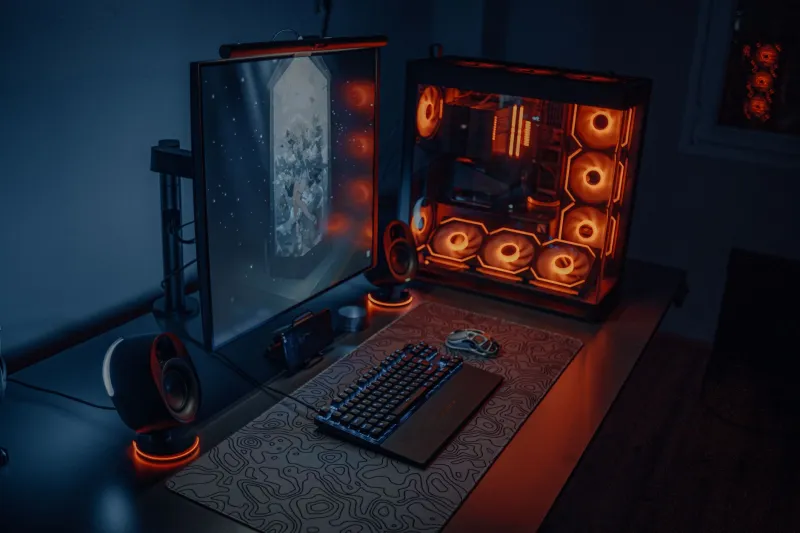
Here's the truth nobody wants to hear: you could have the best game sense in your entire region and still be getting outpaced by players with superior hardware. A monitor running at 60Hz against someone on 240Hz isn't a fair fight. A cheap rubber-dome keyboard when your opponent is on a premium mechanical switch isn't even close. Equipment doesn't replace skill — but it absolutely amplifies it. And in fast-paced action titles where outcomes are decided in milliseconds, that amplification is the difference between carrying and getting carried.
This is your complete 2025 guide to building a high-performance gaming setup. Whether you're starting from scratch, upgrading a specific bottleneck, or trying to squeeze every last millisecond out of an already solid rig, there's something here for you.
Start With the Display: Your Most Important Purchase
If you're only upgrading one thing, make it the monitor. Nothing else in your setup has a bigger impact on your ability to react and track movement in real time.
The key specs to understand are refresh rate, response time, and resolution — in roughly that order of priority for competitive play.
Refresh rate is how many frames your monitor can display per second. At 60Hz, you're seeing 60 frames per second. At 240Hz, you're seeing 240. More frames means smoother, more accurate visual information — your brain and your hands both benefit. For competitive action games in 2025, 144Hz is the realistic minimum. Serious players are running 240Hz, and a growing number of pros have moved to 360Hz panels.
Response time measures how quickly a pixel can change color, usually expressed in milliseconds. Lower is better. Budget monitors might list 5ms or even 8ms; quality gaming monitors hit 1ms or below with GtG (gray-to-gray) measurements. Ghosting and motion blur are the enemies of precision tracking, and a fast response time kills both.
Resolution matters, but not as much as refresh rate for pure competitive performance. Many top players still compete on 1080p because it's easier to push high frame rates at lower resolutions. For a balanced setup that handles both competitive play and visually impressive titles, 1440p at 165Hz or higher is a sweet spot in 2025.
Budget pick: AOC 24G2SP ($150) — 1080p, 165Hz, IPS panel, solid color accuracy.
Performance pick: LG 27GP850-B ($350) — 1440p, 180Hz, Nano IPS.
Elite tier: ASUS ROG Swift Pro PG248QP (~$700) — 1080p, 540Hz, built specifically for esports.
The Mouse and Mousepad Equation
Your mouse is your primary weapon. Treat it like one.
The modern gaming mouse market has largely converged on a few key technologies: optical sensors (more reliable than laser in competitive settings), lightweight designs under 70 grams, and wireless options that have effectively closed the latency gap with wired alternatives.
For action games specifically — shooters, fighting games, fast-paced MOBAs — shape and weight distribution matter as much as specs. A mouse that doesn't fit your grip style will slow you down regardless of how good its sensor is. The three main grip styles are palm (whole hand rests on mouse), claw (fingers arched, tips on buttons), and fingertip (only fingertips contact the mouse). Most major manufacturers now offer shape variants for each.
The mousepad is often overlooked but genuinely matters. A large, consistent surface — at least 18x16 inches — gives you room for low-sensitivity sweeping movements without running out of space. Hard pads offer faster glide and more precision; cloth pads provide more control and are easier on wrist fatigue over long sessions. Most competitive players land somewhere in the middle with a quality cloth pad.
Budget combo: Logitech G305 + Corsair MM300 Extended ($80 total)
Mid-range: Razer DeathAdder V3 HyperSpeed + SteelSeries QcK Heavy ($130 total)
Premium: Logitech G Pro X Superlight 2 + Artisan Zero XL (~$250 total)
Keyboard and Audio: The Underrated Edge
For action games, keyboard choice is about feel and consistency more than any single spec. Mechanical switches offer tactile or auditory feedback that rubber domes simply can't match, and the repeatability of a quality mechanical keyboard means your inputs register exactly when you intend them to — not a frame later.
Actuation force and travel distance are the variables to focus on. Linear switches (like Cherry MX Red or Gateron Yellow) are popular in competitive circles because they actuate smoothly without a tactile bump, allowing for rapid repeated inputs. Tactile switches (like Browns) are preferred by players who want confirmation of each keypress. Avoid clicky switches in most gaming contexts — the noise isn't worth it and they're slightly slower for rapid fire inputs.
For audio, a headset with accurate positional sound is a legitimate competitive tool in any game with spatial audio. You need to hear footsteps, ability cues, and environmental audio with precision. Surround sound processing (via software like Windows Sonic or Dolby Atmos) helps with directional awareness in shooters. A clean microphone matters too — clear communication with teammates is a strategic advantage that too many players undervalue.
Ergonomics: The Long Game
Here's something the highlight reels never show you: the players performing at the highest levels are also the ones who've figured out how to play for hours without their body revolting.
Chair and desk height should position your elbows at roughly 90 degrees when your hands rest on the keyboard. Your monitor should sit at eye level — not below, which forces you to hunch, and not above, which strains your neck. Many players now use monitor arms to dial in exact positioning.
Wrist health is serious. Take breaks. Use a wrist rest if you're prone to fatigue. The "gamer lean" — slouched forward, neck craned — is a posture disaster that will catch up with you. A proper gaming chair with lumbar support, or even a quality office chair like the Secretlab Titan or Herman Miller Aeron, pays dividends over a long career.
Lighting matters more than you'd think. Bias lighting behind your monitor reduces eye strain during long sessions and improves perceived contrast. Keep your room lit — playing in total darkness maximizes eye fatigue. Smart LED strips behind your setup aren't just aesthetic flex; they're actually doing work for your endurance.
Putting It All Together
There's no single "perfect" setup — the right configuration depends on your budget, your primary games, and your physical setup space. But the hierarchy is consistent: prioritize monitor, then input devices, then audio, then ergonomics, then aesthetics. Every dollar spent at the top of that list does more for your actual performance than every dollar spent at the bottom.
The best pro streamers — players like Tfue, shroud, and Ninja — have all spoken about how equipment optimization is an ongoing process, not a one-time purchase. They test, adjust, and iterate. That mindset is the real lesson here.
Build smart. Optimize relentlessly. Dominate the lobby.